
一直没有搞懂CSS中元素定位的问题,这两天在搞一个毛玻璃覆盖的显示效果。借着这个机会把 position 弄通了。
用烂笔头简单记录一下
效果
先看效果: 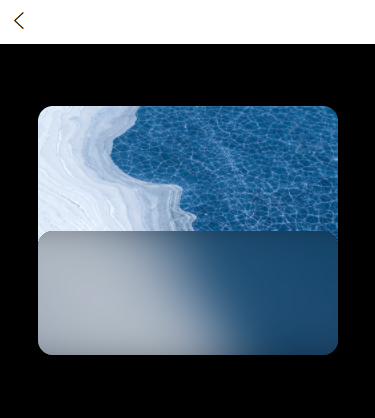
代码
再上代码:
<template>
    <view class="main">
        <view class="sub">
            <view class="third">
                <view class="b1"></view>
                <view class="b2"></view>
            </view>
        </view>
    </view>
</template>

<script>
    export default {
        data() {
            return {

            }
        },
        methods: {

        }
    }
</script>

<style lang="less" scoped>
.main {
    background-color: #000000;
    width: 100%;
    height: 100vh;
    // opacity: 0.5;
    .sub {
        position: relative;
        top: 10%;
        left: 10%;
        background-image: url('../../static/imgs/test002.png');
        background-size: cover;
        background-position: bottom;
        width: 80%;
        height: 40%;
        border-radius: 30rpx;
        .third {
            position: absolute;
            left: 0;
            bottom: 0;
            background-color: #2979FF;
            width: 100%;
            height: 50%;
            border-radius: 30rpx;
            overflow: hidden;
            .b1 {
                background-color: #000000;
                position: absolute;
                left: 0;
                bottom: 0;
                width: 100%;
                height: 100%;
            }
            .b2 {
                background-image: url('../../static/imgs/test002.png');
                background-size: cover;
                background-position: bottom;
                filter: blur(50rpx);
                position: absolute;
                left: -20%;
                bottom: -20%;
                width: 140%;
                height: 140%;
                opacity: 0.8;
            }
        }
    }
}
</style>
说明
template
<view class="main">
    <view class="sub">
        <view class="third">
            <view class="b1"></view>
            <view class="b2"></view>
        </view>
    </view>
</view>
- main :整个画面
- sub :卡片主体
- third :下半截毛玻璃遮罩层
- b1 :遮罩层底色
- b2 :遮罩层真毛玻璃层
style
着重说明:position: relative; 和 position: absolute;
在 CSS 中 position 属性有以下定义。
| 值 | 描述 |
|---|---|
| absolute | **生成绝对定位的元素,相对于 static 定位以外的第一个父元素进行定位。 |
元素的位置通过 "left", "top", "right" 以及 "bottom" 属性进行规定。**
fixed| 生成固定定位的元素,相对于浏览器窗口进行定位。
元素的位置通过 "left", "top", "right" 以及 "bottom" 属性进行规定。
relative| **生成相对定位的元素,相对于其正常位置进行定位。
因此,"left:20" 会向元素的 LEFT 位置添加 20 像素。**
static| 默认值。没有定位,元素出现在正常的流中(忽略 top, bottom, left, right 或者 z-index 声明)。
sticky| 粘性定位,该定位基于用户滚动的位置。
它的行为就像 position:relative; 而当页面滚动超出目标区域时,它的表现就像 position:fixed;,它会固定在目标位置。
注意 : Internet Explorer, Edge 15 及更早 IE 版本不支持 sticky 定位。 Safari 需要使用 -webkit- prefix。
inherit| 规定应该从父元素继承 position 属性的值。
initial| 设置该属性为默认值
filter: blur(50rpx); opacity: 0.8;
设置滤镜(filter)为高斯模糊(blur),模糊半径为 50rpx;
模糊后设置图层透明度为 80%。
left: -20%; bottom: -20%; width: 140%; height: 140%;
模糊后,模糊图层的边缘会被淡化,为了半透明后整个图层均匀,将模糊后的图层长宽放大原来的 140% ,并定位起点横纵坐标回 20%,用来让画面居中。
overflow: hidden;
模糊画面放大后,图层会超出上一级的显示范围,使用overflow: hidden;设置超出部分隐藏。